
FAQs

Buying Animals
Why does it take some time for animal history to show on my newly purchased animal?
When you enter an animal in the purchase screen in myHERD, the animal immediately shows in your myHERD stock list and is ready for you to enter any events. Behind the scenes there are a lot of automated actions that happen to fill in the blanks of the animal history. If your seller has sold the animal off their herd on a date before the date you have entered your purchase then the animal history will flow into myHERD quickly. The delay happens when:
-
your seller has not sold off the animal
-
the date of their sale conflicts with the date of your purchase
Where the above issues arise, the myHERD team work on your behalf to get this resolved as quickly as possible.
What can I do to help the animal history show faster?
- Ensure the seller has sold the animal off their records
- Know the date that the seller has used to sell the animal off their records and use the day after for your purchase event in myHERD.
I am purchasing animals. What is best practice?
- No matter how many animals you are purchasing, always get a stock list from your seller/s showing birth IDs and EIDs (NAIT number on the white button tag) of the animals you have purchased.
- Read the animals tags (EID with a wand and birth ID visually) when they arrive on farm. Compare this to the stock list you were given to ensure the animals you purchased ARE the animals you received.
- Take note of any EIDs that differ from the stock list provided.
- If the animals received are not the animals you purchased, you will need to contact the seller/stock agent to resolve this.
For a small group of animals
- Enter the purchases into the myHERD purchase screen one by one.
For a large group of animals
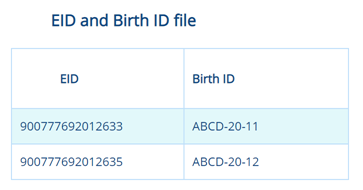
- Download the information from the wand, add birth IDs against the EIDs.
- Import the file into your purchases screen on myHERD. The file needs to be formatted as per below:
- Alternatively, email the file to myherd@crv4all.co.nz and the myHERD team will import the file for you.
What is the difference in purchasing from an LIC customer versus another myHERD customer?
Do purchase events in myHERD create a NAIT movement?
Yes, BUT only if:
-
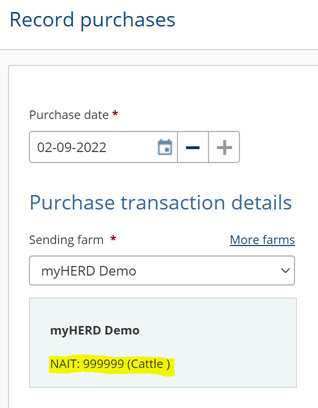
You have added a ‘sending farm’ to the event and the sending farm chosen has the NAIT number showing, example below:
- You have myHERD set up correctly to carry out your NAIT transactions by:
- Setting Farm IQ Systems Ltd as your Information Provider in NAIT
- Ticked YES to myHERD in Office > Admin > Settings > Farm Data Settings
- Added your NAIT number into myHERD in Office > Admin > Farm ID Numbers > NAIT Numbers.
How do I stop the NAIT transactions from being sent to NAIT for a purchase?
Who can I contact for support?
FAQs you may also be interested in
Farm Source Data Connection
Fonterra farmers can now securely connect their CRV myHERD records directly to Fonterra, helping pre-populate Farm Dairy Records.
Read more
Access to genomic information
If you're a myDNA customer, you'll automatically receive access to genomic information through myHERD on your DNA profiled females.
Read more
Better on-farm decisions start with just one. Switching to myHERD.
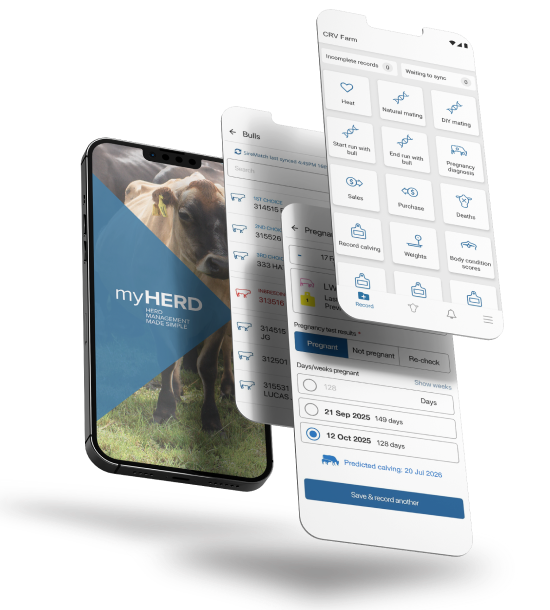
With myHERD, it’s never been easier to input and interpret your herd data from any device, for more effective decision making.